
Why Acer Monitor Blinking Blue Light?
Acer monitors blinking blue light indicates some significant problems. Power supply problems, capacitor problems, transistor problems, or even a dead monitor are all examples of this. There are some effective steps to fix the monitor power button blinking blue problem. Sometimes power reset will fix it. You should check the rest factors if the reset doesn’t work. We will discuss the following facts in more detail.
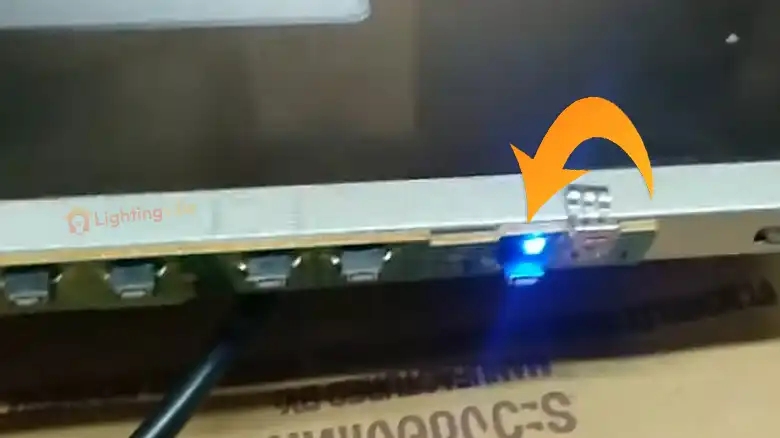
What Causes Acer Monitors to Blink Blue Lights?
Is there a reason for the blue light on my Acer monitor to blink? Your monitor’s video card is responsible for this problem. The monitor blinks whenever you set it to a higher refresh rate or resolution. Other factors may also contribute to such an issue. To get all the details, scroll down.
Nowadays, most monitor manufacturers use blinking patterns to determine how your screen operates. When the power indicator flashes blue, the screen usually goes black.
If the blue light on a monitor is blinking, it’s in standby mode. Press the keyboard button to wake up the monitor. However, In our experience, sometimes monitors don’t light up no matter what key you press. Hardware or power supply issues usually cause this.
There Are Several Reasons Why Your Acer Monitor Blinks Blue Light
- Faulty cable/connection
- Unsuitable power supply
- Incompatible resolution
- Outdated drivers
- Corrupted capacitors
- A broken monitor
Reason 1. Faulty connection: Ensure that all your cables are functioning correctly before diving into the heart of the issue. Check whether video I/O cables are functioning at total capacity before anything else. It is possible to test these cables on a different monitor or by swapping out the cables. Also, ensure your monitor is firmly connected to your CPU and the power outlet. Ensure that the connection methods and their respective ports (HDMI, DisplayPort) are in good condition.
Reason 2. Faulty Power Supply: It’s time to focus on the power supply of the problem that still bothers you. An electronic device requires power and energy to operate. Whenever there is a fault, it malfunctions. The leading reasons for faulty power supply are 1. Defective power cable 2. Worn-out wires 3. Bad power supply board 4. faulty circuit breaker 5. Bad or blown-out capacitor, and 6. Non-working transistor.
Reason 3. Incompatible Resolution: Acer monitors fail to light up because of incompatible video settings. Therefore, the logic is the same for your case as well. Increasing your computer’s resolution and refresh rate beyond what your monitor supports can cause it to go black, so all you can see is blue light.
Reason 4. Outdated Drivers: Your Acer monitors will only operate fully if you have the latest display drivers. If your monitor blinks blue light and goes dark, it’s probably because your display component couldn’t communicate with your operating system. Update your display driver to the latest version to avoid this unfortunate scenario.
Reason 5. Corrupted Capacitors: Your computer’s blue light blinking is probably caused by bad capacitors, one of the most common causes. Due to voltage overloads and high temperatures, worn-out capacitors often bulk up over time. It’s best to take your monitor to a nearby repair center if none of the above methods work. A maintenance specialist may suggest a solution or replace the capacitor.
Reason 6. Dead Monitor: The main culprit is your monitor if all the above methods fail. The answer will vary depending on how long you have been using the monitor. It is essential to pay attention to the monitor after long periods of use. Sometimes, the entire part goes wrong, and there needs to be a way to fix it. And this is the time when you have to replace your monitor.
How to Fix a Monitor Blinking Blue Light?
You can fix this blue light issue on your monitor by unplugging the power supply and turning it on later. You can discard the electrostatic charges accumulated on your device and see that it is again operational. In addition to this, you can follow a few other methods. However, It is important to remember that not all fixes will work for you. Make sure you try different methods as well. Here is a video that explains everything.
Frequently Asked Questions
What is Wrong with My Acer Monitor?
A faulty power supply is the first cause. Sometimes, it needs to be power reset effectively. You may also need to replace some components or wires that are defective.
Does the Acer Monitor Have Speakers?
Built-in speakers are available in some models, simplifying setup. Some models also feature audio jacks and HDMI ports. To set it up, you need external speakers.
Why Is The Light on My Monitor Blinking?
Modern monitors typically use LED blink codes to indicate when they receive power and can operate but remain in standby mode. Monitor LEDs may blink and turn yellow or another color other than green in these situations.
Conclusion
To solve the blinking blue light issue on the Acer monitor, we have assembled all the significant factors with solutions. Acer monitors can blink blue light due to power problems, bad capacitors, bad transistors, or even dead monitors. Could you check these factors? Please check if not. If you are still determining whether the capacitor, transistor, or dead monitor is going bad, consider consulting a professional or Acer support center.
